Most discussions around agent harnesses start from the wrong place.
They start with more agents. Or more tools. Or a bigger context window. Or another orchestration framework that promises to make agents collaborate like a miniature engineering team.
That is not the core problem.
The core problem is that software development already has a workflow, but the workflow lives in human judgment, local conventions, scattered documents, half-remembered postmortems, and project-specific commands. A single prompt does not preserve that structure. A raw agent loop does not know when to load which context, which tool has authority, what counts as validation, or what should become reusable after the run.
An agent harness should solve that.
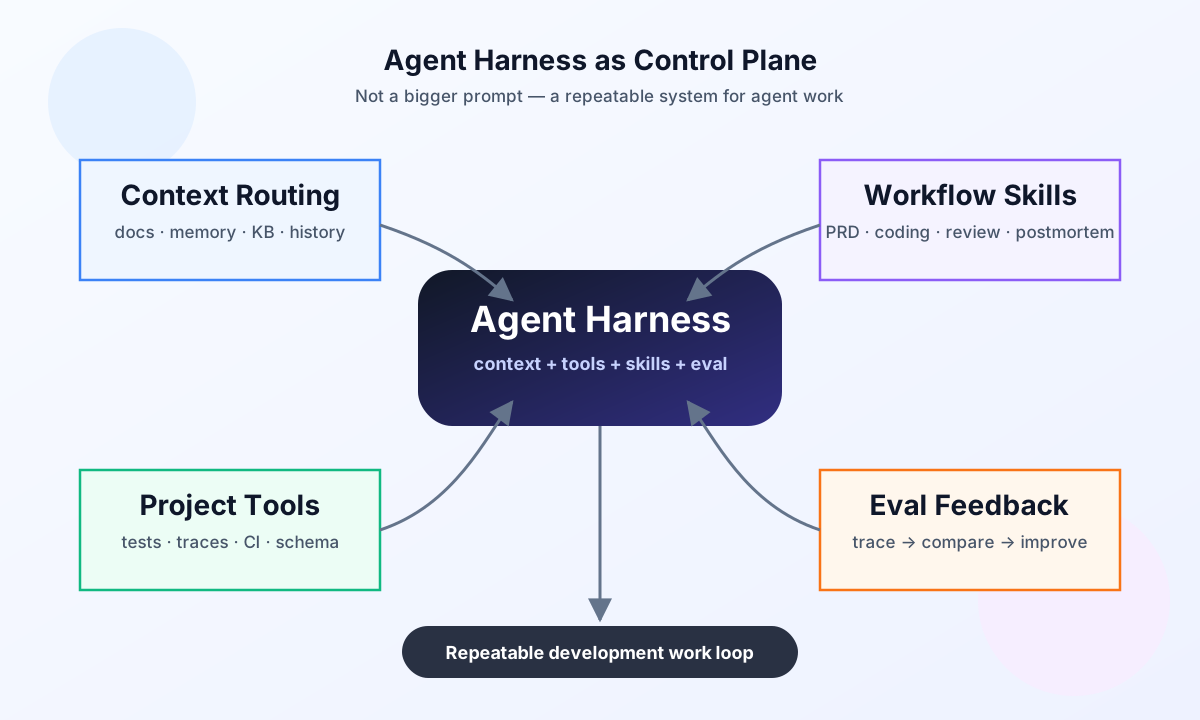
An agent harness turns development process into agent-executable patterns.
It is not a bigger prompt. It is the control plane that composes context routing, workflow skills, project-specific tools, and evaluation feedback into a repeatable work loop.
Multi-agent is a context strategy
Multi-agent systems are usually described as role decomposition:
- a product manager agent;
- an engineer agent;
- a reviewer agent;
- a testing agent.
That framing is useful, but shallow. It easily becomes organization-chart cosplay.
The deeper reason multi-agent helps is context distribution.
A real project contains too much context for one window: product intent, codebase structure, previous decisions, test failures, issue history, design constraints, deployment rules, and local conventions. Different stages of work do not need the same slice of that context.
A PRD agent needs product constraints and user intent. A coding agent needs the scoped spec, relevant code, and repo conventions. A validation agent needs acceptance criteria, traces, tests, and known regressions. A reviewer needs the diff, risk model, and prior failure patterns.
So the interesting object is not the agent role. The interesting object is the context projection.
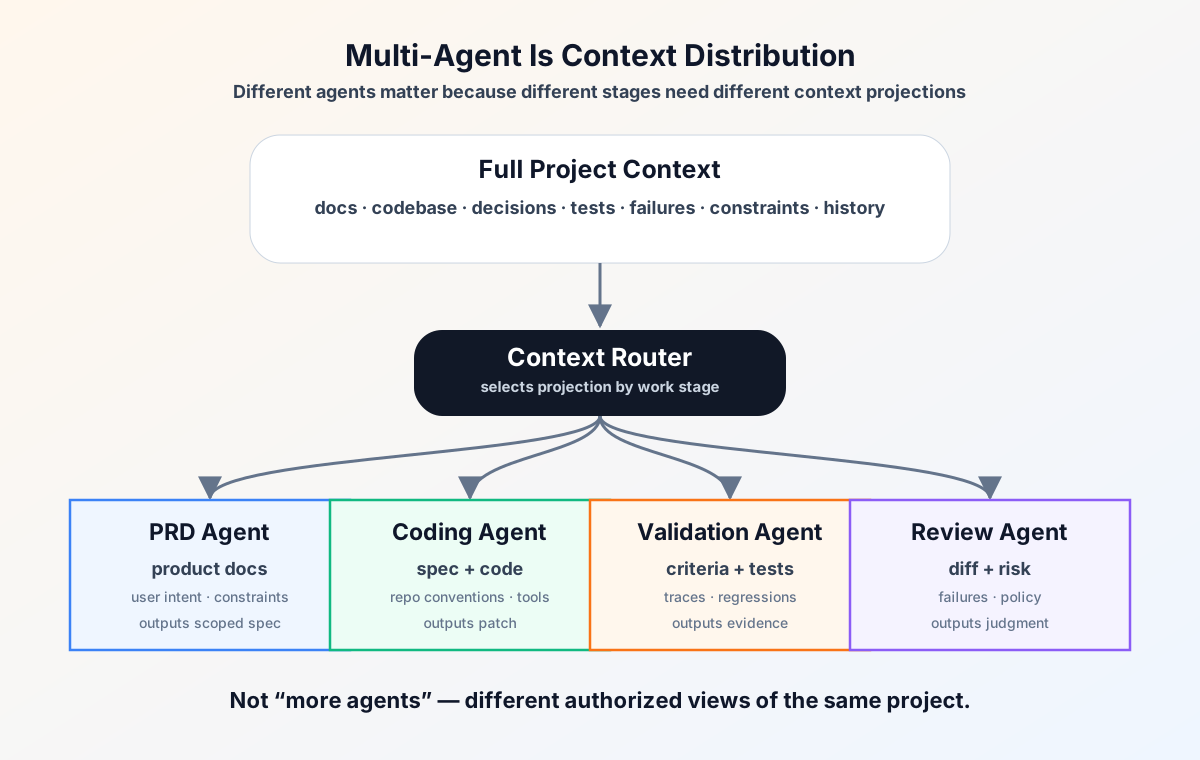
Multi-agent is often less about parallel labor and more about routing the right context to the right stage.
You can do the handoff with documents, but “document” is too broad a word. A spec, a code map, a test trace, a postmortem, a memory entry, and a skill are all documents, but they have different authority, lifecycle, and use sites.
A harness should know those differences.
A useful context layer needs categories, not just storage:
| Context type | What it preserves | When it should be loaded |
|---|---|---|
| Product context | user intent, constraints, non-goals, acceptance criteria | PRD, planning, scope decisions |
| Code context | relevant files, architecture, APIs, dependency shape | implementation and refactor |
| Runtime context | terminal state, logs, traces, running processes, test output | debugging and continuation |
| Decision context | why a choice was made, rejected alternatives, authority | design review and conflict resolution |
| Knowledge context | reusable domain/project facts | anytime it changes interpretation |
| Memory context | durable priors, preferences, recurring facts | before behavior should be biased |
| Postmortem context | failures, fixes, prevention rules | before repeating similar work |
| Skill context | executable procedure for a stage | when entering that workflow stage |
The harness should not ask, “What can I fit into the prompt?”
It should ask, “Which context type does this stage need, and what authority does that projection carry?”
Skills are context-bound procedures
A skill is not just a prompt snippet.
A useful skill says:
- when to use it;
- what context to load;
- what procedure to follow;
- which tools to call;
- what counts as done;
- which failures to avoid.
That makes a skill a context-bound procedure.
For harness design, skills also need categories. Otherwise “skill” becomes another junk drawer:
| Skill type | Job |
|---|---|
| Planning skill | turn intent into scope, constraints, non-goals, acceptance criteria |
| Implementation skill | guide patch shape, repo conventions, coding loop, tests-first discipline |
| Validation skill | decide what evidence is enough: tests, build, traces, screenshots, benchmark |
| Review skill | inspect diff against intent, risk, regressions, security, maintainability |
| Tool-use skill | teach the agent how to use project-specific commands and APIs safely |
| Recovery skill | handle stuck loops, repeated failures, reroute/escalate/stop conditions |
| Postmortem skill | distill failures into reusable procedure, policy, or tool improvements |
| Publishing skill | package output for external surfaces: blog, PR, email, docs, release notes |
The category matters because each skill wants a different context projection and a different definition of “done.”
This is why skills feel like “lubrication” for the development process. They preserve the small operational knowledge that otherwise lives in a senior engineer’s head: how to write the PRD, how to narrow the patch, how to validate a change, how to review the diff, how to turn a failure into a postmortem without polluting long-term memory.
Traditional development still looks recognizable:
PRD → design → implementation → validation → review → postmortem
The harness version is not magic. It is the same workflow made executable:
typed context → stage skill → project tool → agent loop → eval trace → pattern update
The point is not to pretend the old process disappeared. The point is to package the reusable parts so an agent can follow them without rediscovering the process from scratch every time.
Generic tools give hands. Project tools give proprioception.
Early agent tool access was generic:
- web search;
- browser;
- terminal;
- file read/write.
Those are necessary. They give the agent hands.
But serious development needs project-specific tools:
- run the relevant tests for this diff;
- fetch issue context in the project’s schema;
- open the trace for this failure;
- validate one route or one schema;
- compare benchmark runs;
- inspect feature flags;
- preview the local app;
- find the owner or dependency path for a file.
Generic tools let an agent act. Project-specific tools let it feel where it is acting.
Generic tools give the agent hands. Project-specific tools give it proprioception.
This is one of the biggest differences between a chat agent and a harness. A chat agent can grep, guess, and run commands. A harness exposes the project as an agent-operable environment.
That also changes the meaning of tool access. “More tools” is not automatically better. The useful question is whether the tool compresses project knowledge into a safer, more direct action surface.
A repo-specific test runner is better than telling the agent to guess which command to run. A typed trace viewer is better than asking it to scrape logs. A schema validator is better than hoping it notices a runtime error later.
The harness should turn project structure into tools.
Eval is the hill-climbing surface
If a harness cannot evaluate its runs, it cannot improve. It can only accumulate prompt tweaks.
But harness evaluation is not only a benchmark number. Development workflows have hard signals and soft signals.
Hard signals are measurable:
- tests pass;
- build passes;
- lint passes;
- benchmark improves;
- issue is resolved;
- regression is covered;
- human intervention count drops.
Soft signals are still real:
- did the context handoff preserve intent?
- did the agent stop at the right boundary?
- did validation catch the actual risk?
- did the workflow reduce confusion?
- did the postmortem produce a reusable pattern?
- did the next run become easier?
That means harness eval is trace-based comparison under imperfect metrics.
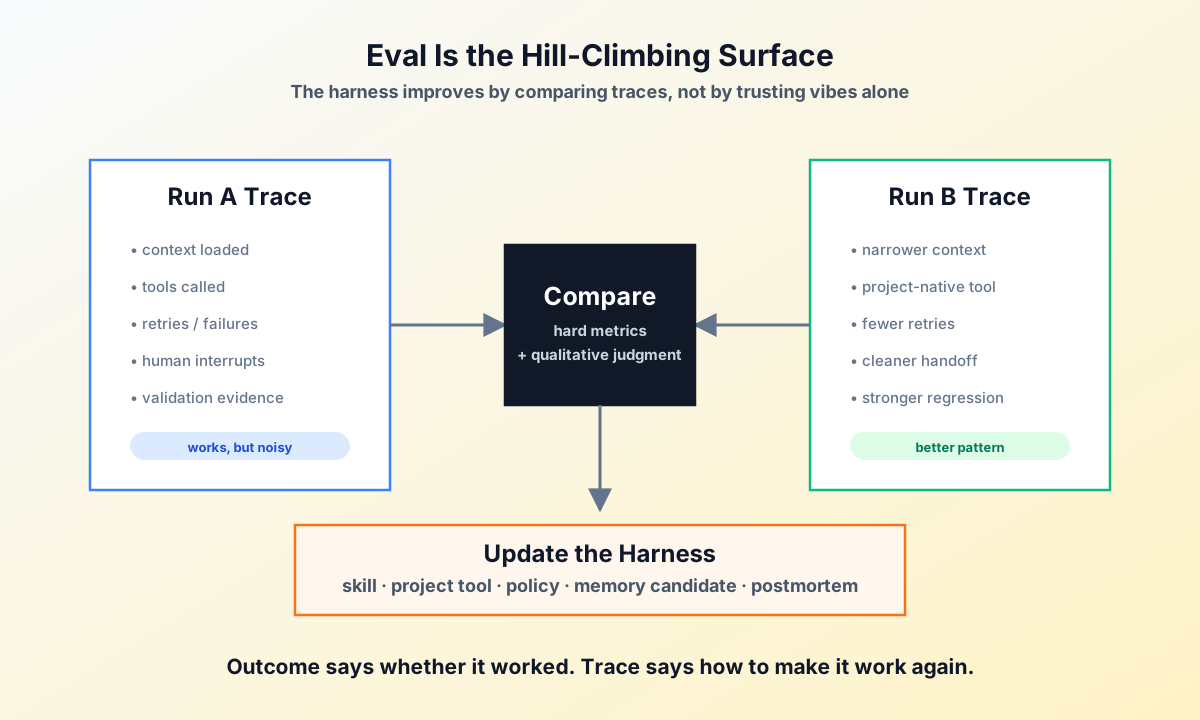
The final outcome only says whether one run worked. The trace says how to make it work again.
A useful trace records:
- which context was loaded;
- which tools were called;
- where the agent failed or retried;
- what evidence validated the result;
- when the human was interrupted;
- which part should become a skill, tool, policy, memory candidate, or postmortem.
This is how hill climbing happens. Not by believing the agent’s self-report, and not by optimizing one synthetic score, but by comparing traces and distilling better patterns.
The full loop
Put together, the harness loop looks like this:
- decompose the work into recognizable development stages;
- attach typed context to the current stage;
- select the relevant skill;
- expose project-specific tools;
- run the agent loop;
- validate with evidence;
- compare traces;
- update the skill, tool, policy, memory candidate, or postmortem.
Each part solves a different failure mode:
Multi-agent solves context distribution.
Skills solve procedure reuse.
Tools solve environment coupling.
Eval solves hill climbing.
Memory solves durable priors.
Postmortem solves pattern extraction.

Harness composes them into a repeatable development loop.
That is the useful framing.
An agent harness is not primarily about making agents resemble a human team. It is about making the development process legible enough for agents to execute, validate, recover, and improve.
The future of agent development will not be won by the system with the most elaborate org chart of agents.
It will be won by the system that routes context precisely, exposes the project through useful tools, validates work through traces, and turns successful runs into reusable patterns.